


AI
AI摘要
此内容由AI根据正文内容自动生成
AI 正在生成摘要...
效果展示:

找到主题文件:
/wp/content/themes/zibl/inc/functions/zib-posts-list.php
然后在里面搜索:获取卡片模式的
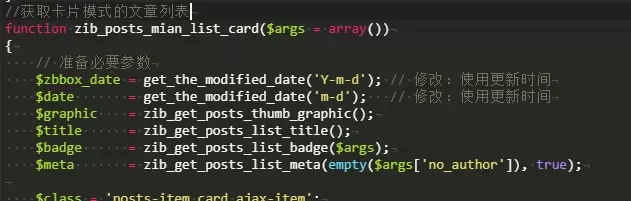
然后,替换下面的代码
//获取卡片模式的文章列表
function zib_posts_mian_list_card($args = array())
{
$graphic = zib_get_posts_thumb_graphic();
$title = zib_get_posts_list_title();
$badge = zib_get_posts_list_badge($args);
$meta = zib_get_posts_list_meta(!$args['no_author'], true);


$class = 'posts-item ajax-item card';
$style = _pz('list_card_option', '', 'style');
$class .= $style && $style != 'null' ? ' ' . $style : '';


// 三点和时间功能开始
$svg_icon = '<svg t="1718343757391" class="icon" viewBox="0 0 1024 1024" version="1.1" xmlns="http://www.w3.org/2000/svg" p-id="6786" width="20" height="20">
<path d="M690.176 843.776l239.616-358.4c10.24-14.336 6.144-32.768-8.192-43.008-4.096-4.096-10.24-6.144-16.384-6.144H716.8v-225.28c0-16.384-14.336-30.72-30.72-30.72-10.24 0-20.48 6.144-24.576 14.336L421.888 552.96c-10.24 14.336-6.144 32.768 8.192 43.008 4.096 4.096 10.24 6.144 16.384 6.144H634.88v225.28c0 16.384 14.336 30.72 30.72 30.72 10.24 0 20.48-6.144 24.576-14.336z" p-id="6787" fill="#17abe3"></path>
<path d="M204.8 231.424h204.8c34.816 0 61.44 26.624 61.44 61.44s-26.624 61.44-61.44 61.44H204.8c-34.816 0-61.44-26.624-61.44-61.44s26.624-61.44 61.44-61.44z m0 491.52h204.8c34.816 0 61.44 26.624 61.44 61.44s-26.624 61.44-61.44 61.44H204.8c-34.816 0-61.44-26.624-61.44-61.44s26.624-61.44 61.44-61.44z m-81.92-245.76h163.84c34.816 0 61.44 26.624 61.44 61.44s-26.624 61.44-61.44 61.44H122.88c-34.816 0-61.44-26.624-61.44-61.44s26.624-61.44 61.44-61.44z" opacity=".3" p-id="6788" fill="#17abe3"></path>
</svg>';
$html = '';
$html .= '<posts class="' . $class . '">
<div class="item-body">';


global $post;
$post_id = $post->ID;
$cache_key = 'post_modified_time_' . $post_id;
$modified_time = get_transient($cache_key);
if (false === $modified_time) {
$query = new WP_Query(array(
'post__in' => array($post_id),
'fields' => 'ids',
));
if ($query->have_posts()) {
while ($query->have_posts()) {
$query->the_post();
$modified_time = array(
'full' => get_the_modified_time('Y-m-d'),
'short' => get_the_modified_time('m-d')
);
}
}
wp_reset_postdata();
set_transient($cache_key, $modified_time, HOUR_IN_SECONDS);
}
if (is_array($modified_time) && isset($modified_time['full']) && isset($modified_time['short'])) {
$html .= '<div class="tools">
<div class="circle">
<span class="red tfbox"></span>
</div>
<div class="circle">
<span class="yellow tfbox"></span>
</div>
<div class="circle">
<span class="green tfbox"></span>
</div>


<span class="tengfei_soft_time" style="color: #7772ff; text-align: right;">
' . $svg_icon . '
</span>
<div class="tengfei_posts_wap">
' . $modified_time['full'] . '
</div>
<div class="wppc">
' . $modified_time['short'] . '
</div>
</div>';
} else {
$html .= '<div class="tools">
<div class="circle">
<span class="red tfbox"></span>
</div>
<div class="circle">
<span class="yellow tfbox"></span>
</div>
<div class="circle">
<span class="green tfbox"></span>
</div>


<span class="tengfei_soft_time" style="color: #7772ff; text-align: right;">
' . $svg_icon . '
</span>
<div class="tengfei_posts_wap">
N/A
</div>
<div class="wppc">
N/A
</div>
</div>';
}
// 三点和时间功能结束
$html .= $graphic;
$html .= $title;
$html .= $badge;
$html .= $meta;
$html .= '</div>';
$html .= '</posts>';


return $html;
}
/*手机端不显示CSS代码*/
@media screen and (max-width: 1221px) { .wapnone{display:none; }
}
/*三点和时间功能样式*/
.tools{display:flex;align-items:center;margin-top:-5px;margin-bottom:5px;height:22px}.circle{padding:0 4px}.tfbox{display:inline-block;align-items:center;width:10px;height:10px;padding:1px;border-radius:50%}.red{background-color:#2997f7}.yellow{background-color:#ff5144}.green{background-color:#bfc930}span.tengfei_soft_time{font-size:14px;color:#787777;margin-left:auto;margin-right:5px;right:0;pointer-events:none}.tengfei_soft_time svg{margin-right:2px}@media screen and (max-width:1221px){.tengfei_posts_wap{display:none}}.wppc{display:none}@media (max-width:767px){.wppc{display:block !important}}
本站代码模板仅供学习交流使用请勿商业运营,严禁从事违法,侵权等任何非法活动,否则后果自负!
© 版权声明
文章版权归作者所有,未经允许请勿转载。
THE END













暂无评论内容